
Home›AI tools›Notion AIDeutsch
notion

Notion AI: AI that works from the pages your team already wrote

Notion AI is the AI built into the Notion workspace. It writes and edits pages, answers questions from your workspace and connected apps, takes meeting notes and runs agents.

Notion sorts its AI by who starts the work. In a page you ask for a draft or an edit. Notion Agent works for one person in a chat and can take several steps. Custom Agents work for the team in the background, on a schedule or when something happens in Notion or Slack. Enterprise Search and Research Mode answer questions across the workspace, connected apps and the web.

Which model runs is partly your choice: as of September 2026 people pick Claude, GPT, Gemini or Grok models, or leave it on Auto, and admins decide which models are allowed. Whose account serves it is always Notion's: the models run with Notion's providers (Anthropic, OpenAI) and on Notion-hosted models, under Notion's contracts. What you configure is the workspace: identity, connectors, retention, and what agents may see.
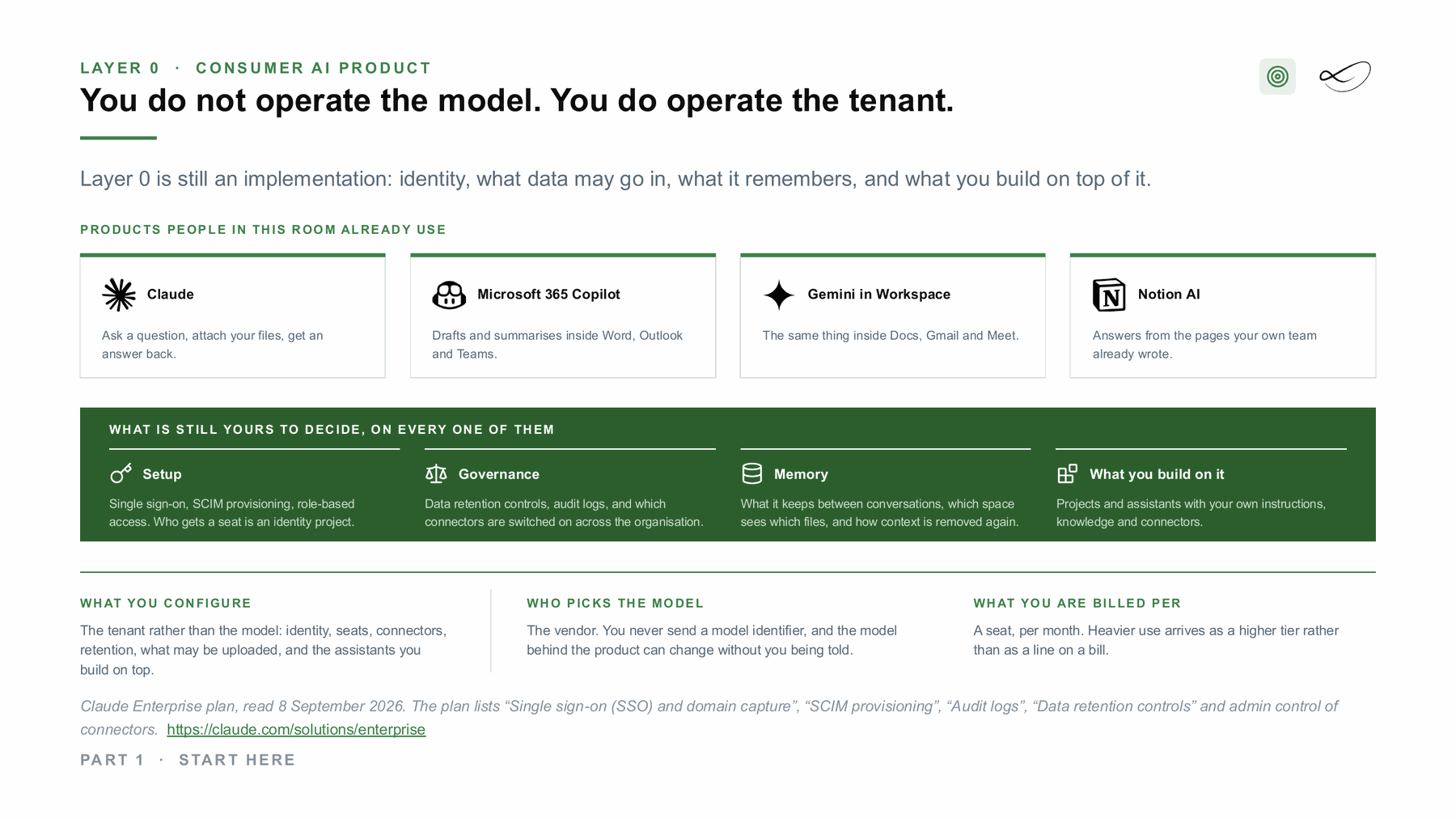
From my course slides (MASE-3, FH Burgenland), read 8 September 2026. Some details on the slide have changed since; the text on this page is current as of September 2026.
From my course slides (MASE-3, FH Burgenland), read 8 September 2026. Some details on the slide have changed since; the text on this page is current as of September 2026.[1]

The family

Notion AI in pages[2]

Web, desktop, mobile
Writes and edits docs, fills database properties, translates and summarises inside your pages.

Notion Agent[3]

Web, desktop, mobile
A personal agent that creates pages and databases, answers questions from your workspace and connected apps, and can act in Slack, Gmail and Calendar.

Enterprise Search[4]

Home tab
Answers questions with citations from your workspace, connected apps and the web.

Research Mode[5]

Home tab
Writes a longer report from your workspace, connected apps and the web. A run can take up to 10 minutes.

AI Meeting Notes[6]

Desktop, web, mobile
Transcribes a meeting and writes a summary with action items. No bot joins the call.

Custom Agents[7]

Web, desktop, Slack
Team agents that run in the background on a schedule or on Notion and Slack events, with only the access you grant.

Notion AI Connectors[8]

Workspace settings
Let Notion AI search Slack, Google Drive, Microsoft Teams, SharePoint and OneDrive, GitHub, Linear, Jira (beta), Gmail, Outlook and Google Calendar.

Skills[9]

Web, desktop
Reusable team instructions for Notion Agent. You can download a skill as a SKILL.md file for Claude Code, Codex, Cursor, Gemini or Grok.

Notion MCP[10]

Remote MCP
A remote MCP server run by Notion. MCP clients such as Claude, ChatGPT, Cursor or Codex read and write Notion with the user's permissions.

Notion API and developer platform[2]

API, CLI
Public API and webhooks, Workers (beta) for your own code on Notion, and an Agent SDK (public beta) to start Custom Agents from your app.

Plans

Full Notion AI starts with the Business plan, as of September 2026; Free and Plus include only a limited trial.

PlanForWhat changes
Free[2]IndividualsOnly a limited trial of Notion AI.
Plus[2]Small teams and professionalsOnly a limited trial of Notion AI. Basic connections to tools such as Slack and Google Drive.
Business[2]Growing companiesNotion Agent, AI Meeting Notes, Enterprise Search (beta), Research Mode, AI Connectors and SAML SSO. A usage allowance applies; premium models and Custom Agents use Notion credits. Model providers keep data for up to 30 days.
Enterprise[2]Organisations with stricter control and security needsAdds zero data retention with model providers, SCIM, audit log, DLP and SIEM connections, custom retention, an allowlist for AI apps on Notion MCP, and data residency.

Which model runs

Each person picks a model in the chat, the search window or a Custom Agent's settings, or leaves it on Auto. Admins turn premium models on and can restrict which ones Custom Agents may use. List as of September 2026.

Auto[3]default: Notion picks a model per task
Claude Fable 5.1[3]Notion Agent, Business and Enterprise only
Claude Fable 5[7]Custom Agents; an admin must turn it on because Anthropic may store prompts
Claude Sonnet 5[3]Notion Agent and Custom Agents
Opus 5[9]named in the Notion 3.7 release notes
GPT models (e.g. GPT-5.6 Sol)[9]"the newest GPT models"
Gemini[3]available in the model menu
Grok[3]available in the model menu
Kimi K3[9]named in the Notion 3.7 release notes

What you can configure

AI settings[11]Workspace owners on any plan control web search, confirmation before web requests, AI Meeting Notes settings, which models the team may use, and how many credits each member may spend.
AI on or off[12]Organisation owners can turn Notion AI on for some workspaces and off for others.
SAML SSO[13]Business and Enterprise. Needs a SAML 2.0 identity provider and a verified domain.
SCIM provisioning[14]Enterprise only. Okta, OneLogin, Rippling and custom SCIM apps. Guests cannot be managed through SCIM.
Audit log[15]Enterprise. Keeps up to 365 days of events, including reads and edits by integrations and external AI tools, and changes to Custom Agents.
Data retention[16]Enterprise owners set how long pages stay in Trash and how long deleted pages and AI chats are kept: from one day to 10 years, default 30 days.
AI Connectors[8]A workspace owner connects each app once for the whole workspace. Ingesting content can take up to 36 hours.
MCP allowlist[17]Enterprise admins allow only approved AI apps to connect through Notion MCP and can disconnect all users at once.
Custom Agent access[7]Each agent sees only the pages, databases, Slack channels and web access you grant. Admins limit who creates agents and which models they use.
Instructions and skills[3]Each person can give Notion Agent an instructions page ("My Notion AI"). Teams share skills in a library.

What happens to your data

Training, all plans[18]Notion states that "by default, Notion and its AI Subprocessors do not use Customer Data to train any models". Contracts with the model providers forbid training on customer data. Workspace owners can opt in to share data to improve Notion AI.
Retention at model providers[18]Enterprise: zero data retention with the model providers. Other plans: providers keep data "30 days or fewer". Embeddings are deleted within 60 days after a page or workspace is deleted.
Models that keep data[7]Features that need data-retaining models stay off until an admin turns them on. Example: with Claude Fable 5 in Custom Agents, Anthropic may store prompts and responses.
Meeting audio[6]Audio goes to subprocessors for transcription and is not stored there. Notion keeps an upload for up to 3 days only if processing fails.

Europe: GDPR, data residency and the AI Act

DPA and GDPR[19]The Notion Data Processing Addendum applies whenever Notion processes personal data under the GDPR for a customer. Transfers out of the EU rely on standard contractual clauses.
Data residency in the EU[20]Enterprise Plan only, at no extra cost. Data at rest is stored in AWS Frankfurt (EU-Central-1), with backups in Ireland. This covers page content, files and the search index. Notion Mail, Notion Calendar and beta features are not covered.
Processing outside the region[20]Data residency covers storage only. Model providers and other subprocessors can still process data outside the EU. On Enterprise, model providers keep no data.
AI Act[21]Notion's Trust Center says Notion AI is a "limited-risk AI system" and that Notion acts as a deployer of AI systems, not as a model provider.

What the AI Act and the GDPR ask of you as a user →

Hybrid: the same models in your own account

Notion AI itself does not run in your own cloud account. The route goes the other way: Notion becomes the knowledge source for an AI you run in your own account, region and identity, through Notion MCP or the Notion API.
Notion MCP as knowledge source for your own AI[22]Any MCP client connects to Notion's hosted server with OAuth and works with the user's full Notion permissions. Your model can run in your own cloud account; the Notion data still comes from Notion.
Notion API in your own pipeline[23]Read and write pages and databases from your own code, for example to ground a model in your cloud account. Per connection: 600 requests per minute on Business and Enterprise, 180 on other plans, plus a shared workspace limit.
Your own MCP servers inside Notion Agent[9]Notion Agent can call external MCP servers through a custom MCP connection, in beta on Business and Enterprise. Changes in the connected tool need your confirmation.
Skills in local coding agents[9]A skill maintained in Notion downloads as SKILL.md for Claude Code, Codex, Cursor, Gemini or Grok.
Limit: no own model account[18]Notion's documentation describes no way to bring your own API key or run Notion AI on models in your own cloud account. The models run with Notion's providers and Notion-hosted models.
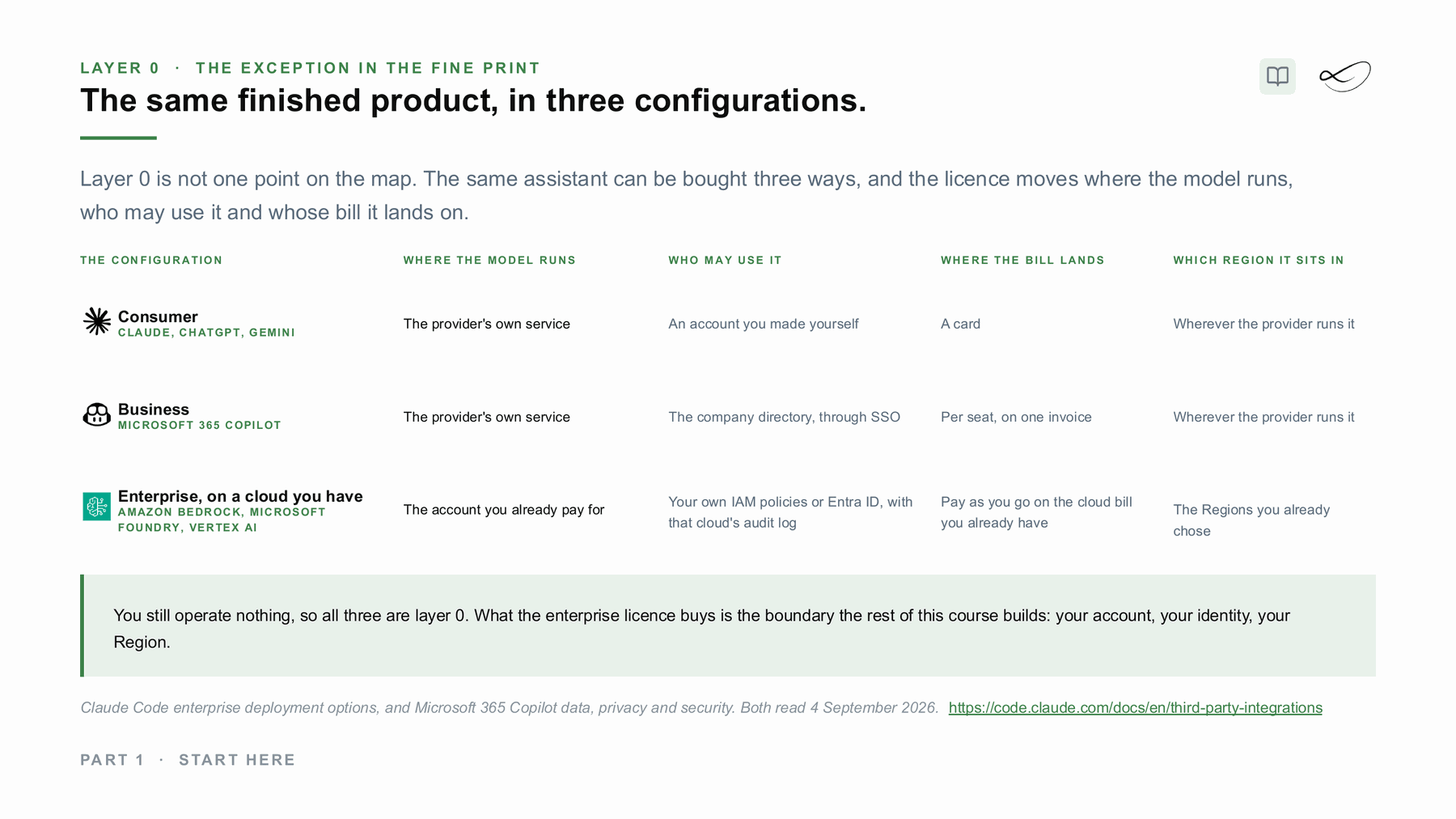
The same finished product, in three configurations: consumer, business, or on a cloud account you already have.
The same finished product, in three configurations: consumer, business, or on a cloud account you already have.[1]
Recently changed
  • Notion 3.7 adds team skills, sub-agents for Custom Agents, a redesigned model picker and custom MCP connections (beta). 15 Sep 2026.
  • Notion's own pages name models differently (Claude Fable 5.1, Claude Fable 5, Opus 5), so check the model menu in your workspace. Sep 2026.
  • The API gives a higher per-connection rate limit on Business and Enterprise (600 requests per minute) than on other plans (180). Sep 2026.
Linda Mohamed
How I use it
Notion is my daily working system, and I am a Notion consulting partner.

What would help you next?

Learn to decide

The course “From Managed to Hybrid” shows where AI should run: what each layer costs, what you operate and where your data has to stay. In preparation, with a free live session first.

Linda MohamedLinda Mohamed
AI and cloud consultant, AWS Community Hero, Vienna

Roll it out with me

Tell me which tools your teams use or want. In 30 minutes we look at plans, settings, data rules and whether AWS funding can cover part of a pilot. How AWS funding works →

You already know what you need

Book a workshop directly:

  • AI Enablement Workshop →
    One workshop for one role, up to 12 people: how your team uses these tools well, and what stays inside the rules.
  • AI Discovery Workshop →
    Sort your ideas into a scored shortlist, so you know which use case is worth more than a tool licence.
ai-solutions.wiki

Read more on ai-solutions.wiki

My open knowledge base, with longer comparisons and sources.

The technology underneath: AI technologies explained →

Sources

  1. Linda Mohamed, course slides “Start here”, MASE-3, FH Burgenland, September 2026
  2. Notion AI in pages, notion.com. https://www.notion.com/pricing
  3. Notion Agent, notion.com. https://www.notion.com/help/notion-agent
  4. Enterprise Search, notion.com. https://www.notion.com/help/enterprise-search
  5. Research Mode, notion.com. https://www.notion.com/help/research-mode
  6. AI Meeting Notes, notion.com. https://www.notion.com/help/ai-meeting-notes
  7. Custom Agents, notion.com. https://www.notion.com/help/custom-agents
  8. Notion AI Connectors, notion.com. https://www.notion.com/help/notion-ai-connectors
  9. Skills, notion.com. https://www.notion.com/releases/2026-09-15
  10. Notion MCP, developers.notion.com. https://developers.notion.com/docs/mcp
  11. AI settings, notion.com. https://www.notion.com/help/notion-ai-faqs
  12. AI on or off, notion.com. https://www.notion.com/help/guides/everything-about-setting-up-and-managing-an-organization-in-notion
  13. SAML SSO, notion.com. https://www.notion.com/help/saml-sso-configuration
  14. SCIM provisioning, notion.com. https://www.notion.com/help/provision-users-and-groups-with-scim
  15. Audit log, notion.com. https://www.notion.com/help/audit-log
  16. Data retention, notion.com. https://www.notion.com/help/custom-data-retention-settings
  17. MCP allowlist, notion.com. https://www.notion.com/help/notion-mcp
  18. Training, all plans, notion.com. https://www.notion.com/help/notion-ai-security-practices
  19. DPA and GDPR, notion.com. https://www.notion.com/help/gdpr-at-notion
  20. Data residency in the EU, notion.com. https://www.notion.com/help/data-residency
  21. AI Act, trust.notion.com. https://trust.notion.com/
  22. Notion MCP as knowledge source for your own AI, developers.notion.com. https://developers.notion.com/docs/get-started-with-mcp
  23. Notion API in your own pipeline, developers.notion.com. https://developers.notion.com/reference/request-limits
  24. Notion as an AI backend, ai-solutions.wiki. https://ai-solutions.wiki/tools/notion-as-ai-backend/

Checked against the vendors' own pages in September 2026. Plans, models and features change often: check the linked pages before you decide.