
Speech to text: turning spoken words into text
Transcription, also called automatic speech recognition, turns audio into written text and records when each word was said.


What is speech to text?
A speech recognition model listens to audio and writes down what was said. Good services also return a timestamp for every word, label who is speaking, and let you add your own vocabulary, so product names and abbreviations come out right.
The timings often matter more than the words. They are what lets you cut a video, write subtitles, or jump to a moment in a recording.
Four ways to run it
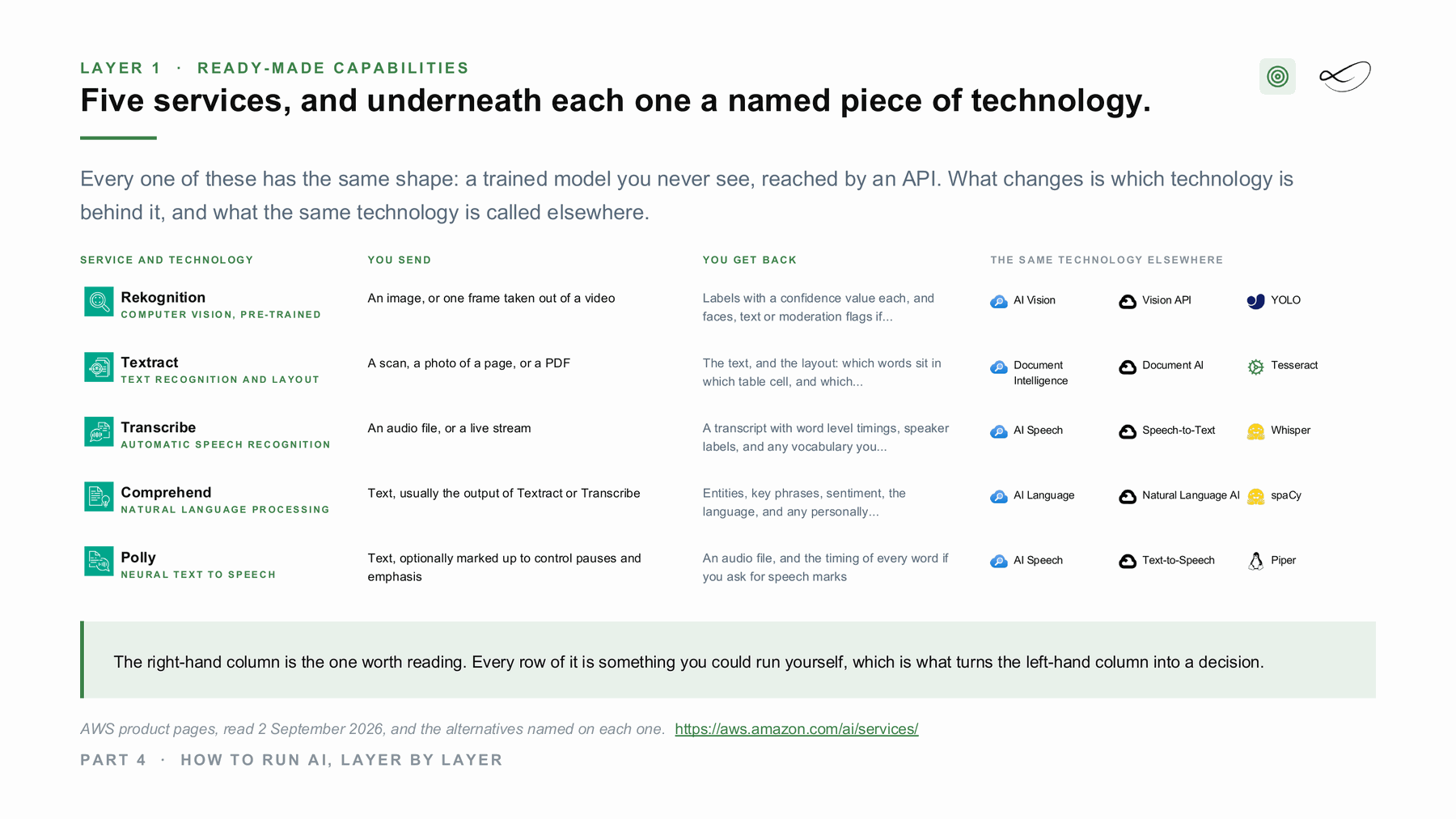
Each of the big clouds offers it as a managed service, and you can also run it yourself. Same task, a different bill and a different console.
Amazon Transcribe[1]
The managed speech-to-text service on AWS. You send audio and get back a transcript with word timings. AWS runs the model; custom vocabularies are yours.
Official documentation →Azure AI Speech[2]
The managed speech service on Microsoft Azure, with speech to text in batch and in real time.
Official documentation →Speech-to-Text[3]
The managed speech recognition API on Google Cloud.
Official documentation →Whisper[4]
An open-weights speech recognition model from OpenAI, released under the MIT licence. It runs on your own machine or GPU, so the audio never has to leave.
Project page →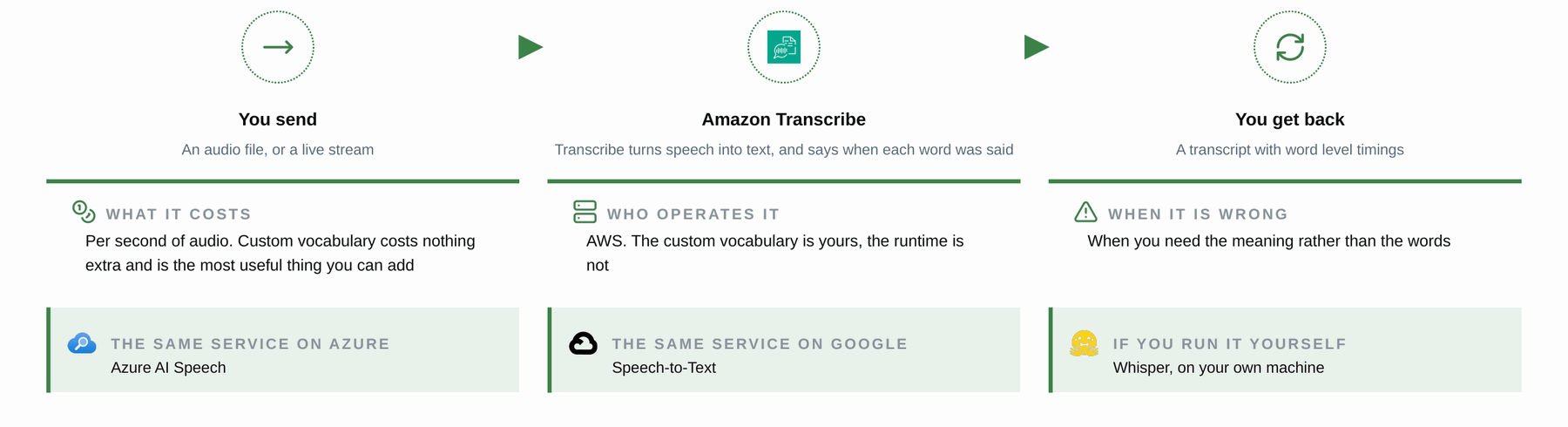
How it looks in an architecture
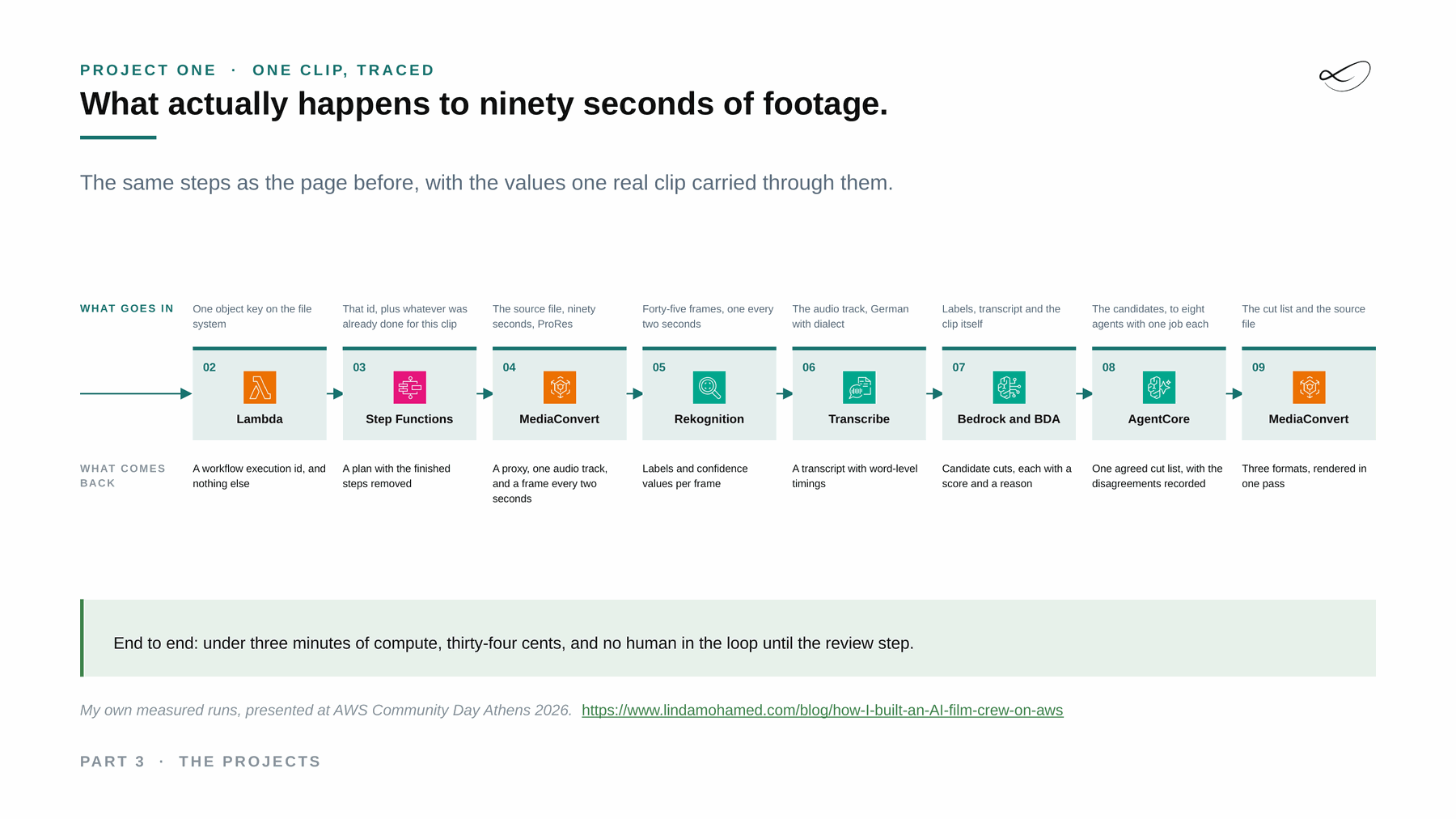
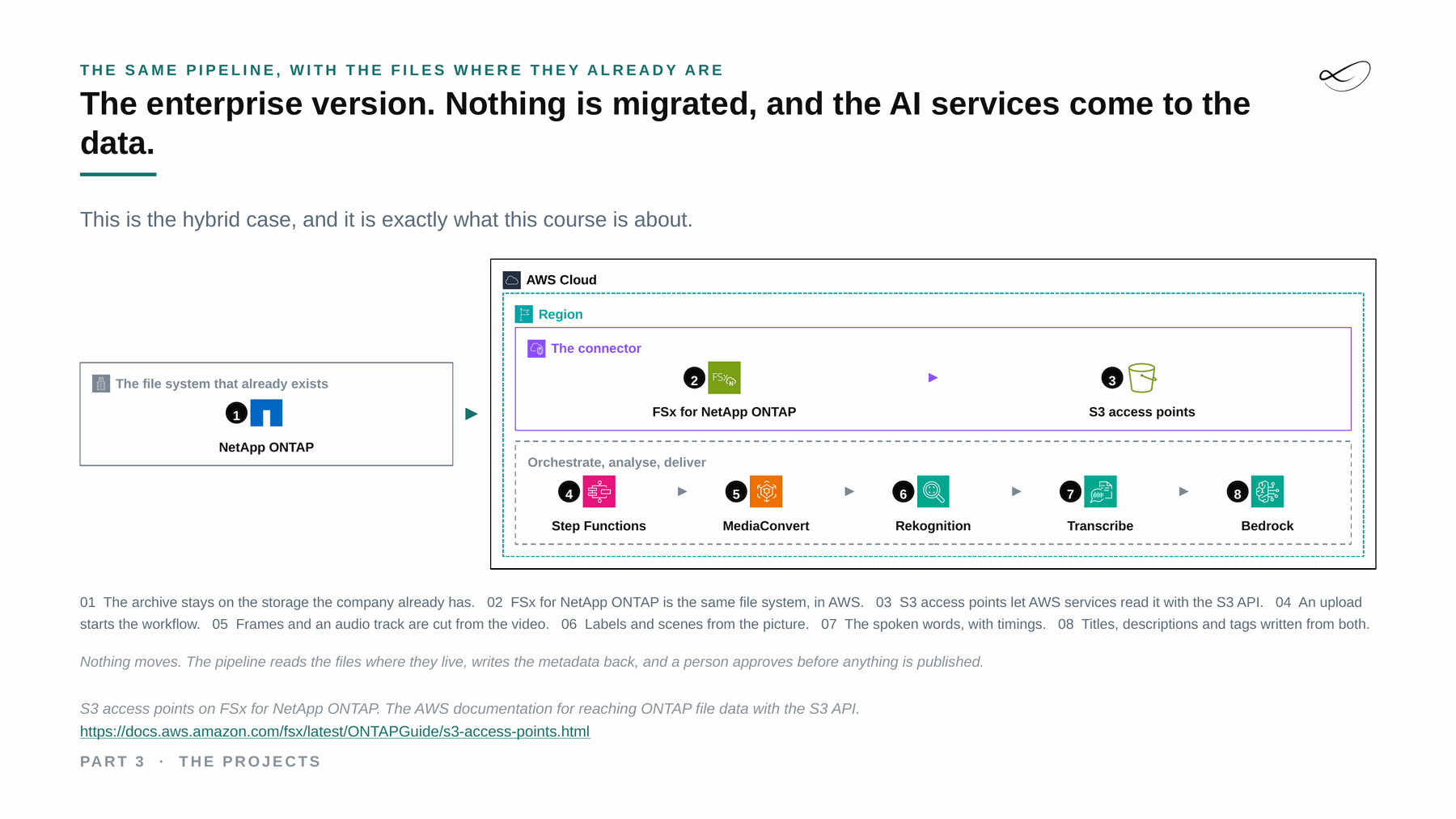
Slides from my course on AI architectures at FH Burgenland, drawn from real projects.
Where I used it
The video pipeline
In my video pipeline, Transcribe writes the transcript behind the subtitles, for about 11 cents a clip. A custom vocabulary was the one setting that mattered: without it the product names came back wrong and every step after it inherited the mistake.
Read the write-up →Managed and self-hosted together: hybrid
With a ready-made service the call leaves your network. The hybrid decision is what crosses, and in what state: the whole file, a redacted one, or only the part that has to. Where a file may not leave at all, the same step runs with the open-source option inside your building, and only the result, or nothing, crosses.[7]
What would help you next?
Learn to decide
The course “From Managed to Hybrid” teaches where AI should run: what each layer costs, what you operate and where your data has to stay. It is in preparation, with a free live session first.
 Linda Mohamed
AI and cloud consultant, AWS Community Hero, Vienna
Build it with me
Tell me what you want to build. In 30 minutes we check which of the four ways fits your data, your rules and your budget, and whether AWS funding for a proof of concept can cover part of it. How AWS funding works →
You already know what you need
Book the workshop directly:
- AI Concept and Prototype workshops →
Architecture first, priced per service and tested on your data, then a prototype with a go or stop decision. - AI Discovery Workshop →
Sort your ideas into a scored shortlist, so you know which use case to build first.

Read more on ai-solutions.wiki
My open knowledge base, with longer comparisons, pricing notes and sources.
Sources
- Amazon Transcribe documentation. https://docs.aws.amazon.com/transcribe/latest/dg/what-is.html
- Azure AI Speech documentation. https://learn.microsoft.com/en-us/azure/ai-services/speech-service/overview
- Speech-to-Text documentation. https://cloud.google.com/speech-to-text/docs
- Whisper. https://github.com/openai/whisper
- Linda Mohamed, course slides “The projects”, MASE-3, FH Burgenland, September 2026
- Linda Mohamed, course slides “How to run AI, layer by layer”, MASE-3, FH Burgenland, September 2026
- S3 access points on FSx for NetApp ONTAP, AWS documentation. https://docs.aws.amazon.com/fsx/latest/ONTAPGuide/s3-access-points.html
- Amazon Transcribe, ai-solutions.wiki. https://ai-solutions.wiki/tools/amazon-transcribe/
- Azure Speech Services, ai-solutions.wiki. https://ai-solutions.wiki/tools/azure-speech-services/
- OpenAI Whisper, ai-solutions.wiki. https://ai-solutions.wiki/tools/whisper/
- AWS AI services vs Azure AI, ai-solutions.wiki. https://ai-solutions.wiki/comparisons/aws-vs-azure-ai/
Links checked September 2026. Product names and features change: check the linked pages before you decide.