
Your own model: train it, version it, serve it
When no ready-made service and no prompt does the job, you train or fine-tune a model on your own data and serve it yourself. An ML platform gives you the same six steps everywhere.


What does running your own model involve?
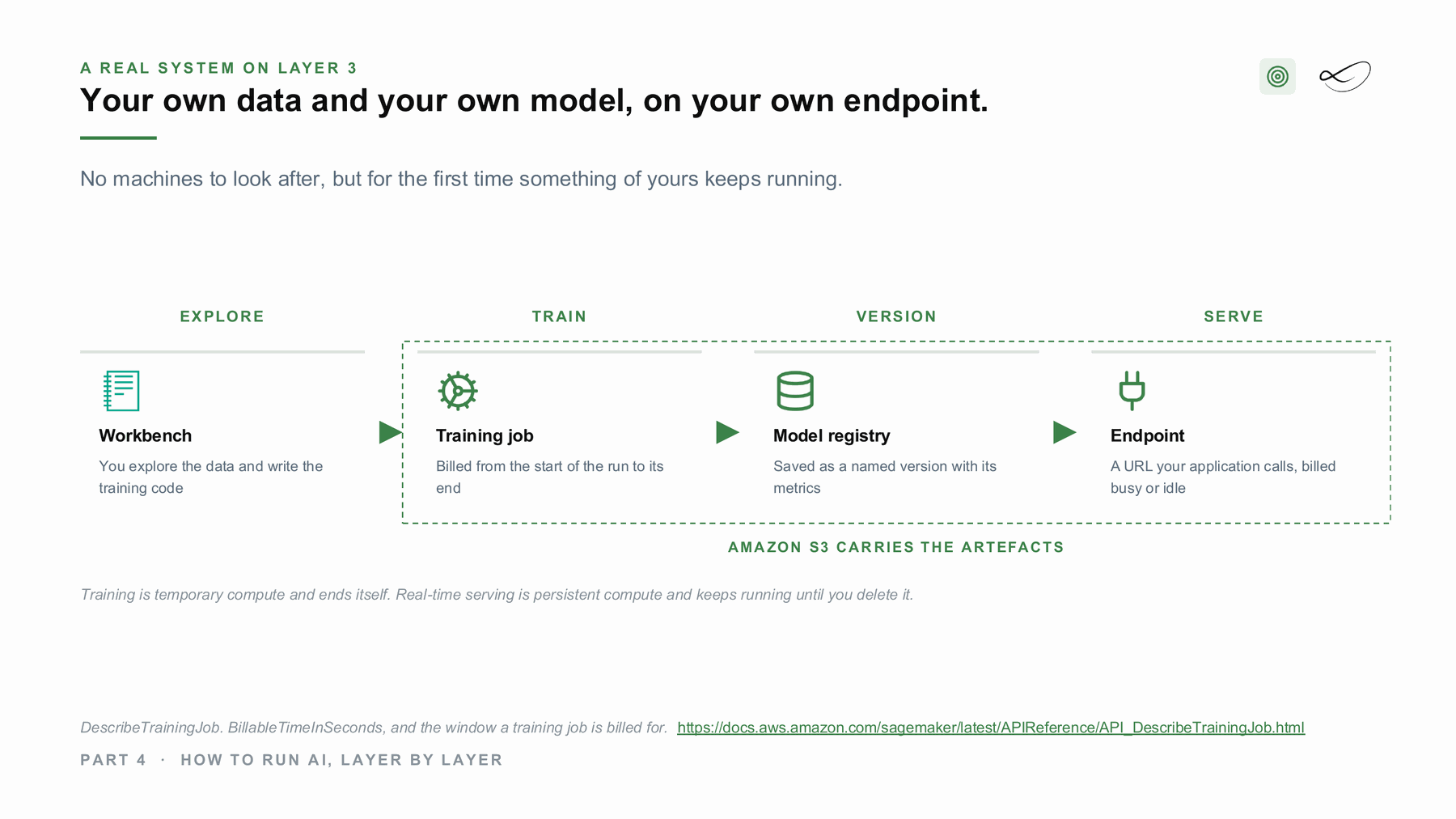
The six steps are always the same: develop in a notebook, train or fine-tune on your data, register the result as a version, deploy it to an endpoint or a batch job, monitor it, and evaluate whether it is still good enough on this month's data. A model is never shipped once.
Training is temporary compute that ends by itself. A real-time endpoint is persistent compute that bills while it waits. Owning the weights does not have to mean owning a machine: a small tuned model can also be imported into a managed service and billed per use.
Four ways to run it
Each of the big clouds offers it as a managed service, and you can also run it yourself. Same task, a different bill and a different console.
Amazon SageMaker AI[1]
The managed machine learning platform on AWS: notebooks, training jobs, a model registry and endpoints.
Official documentation →Azure Machine Learning[2]
The managed machine learning platform on Microsoft Azure.
Official documentation →Vertex AI[3]
The managed AI platform on Google Cloud, with training, a model registry and endpoints.
Official documentation →Red Hat OpenShift AI, Kubeflow and MLflow[4]
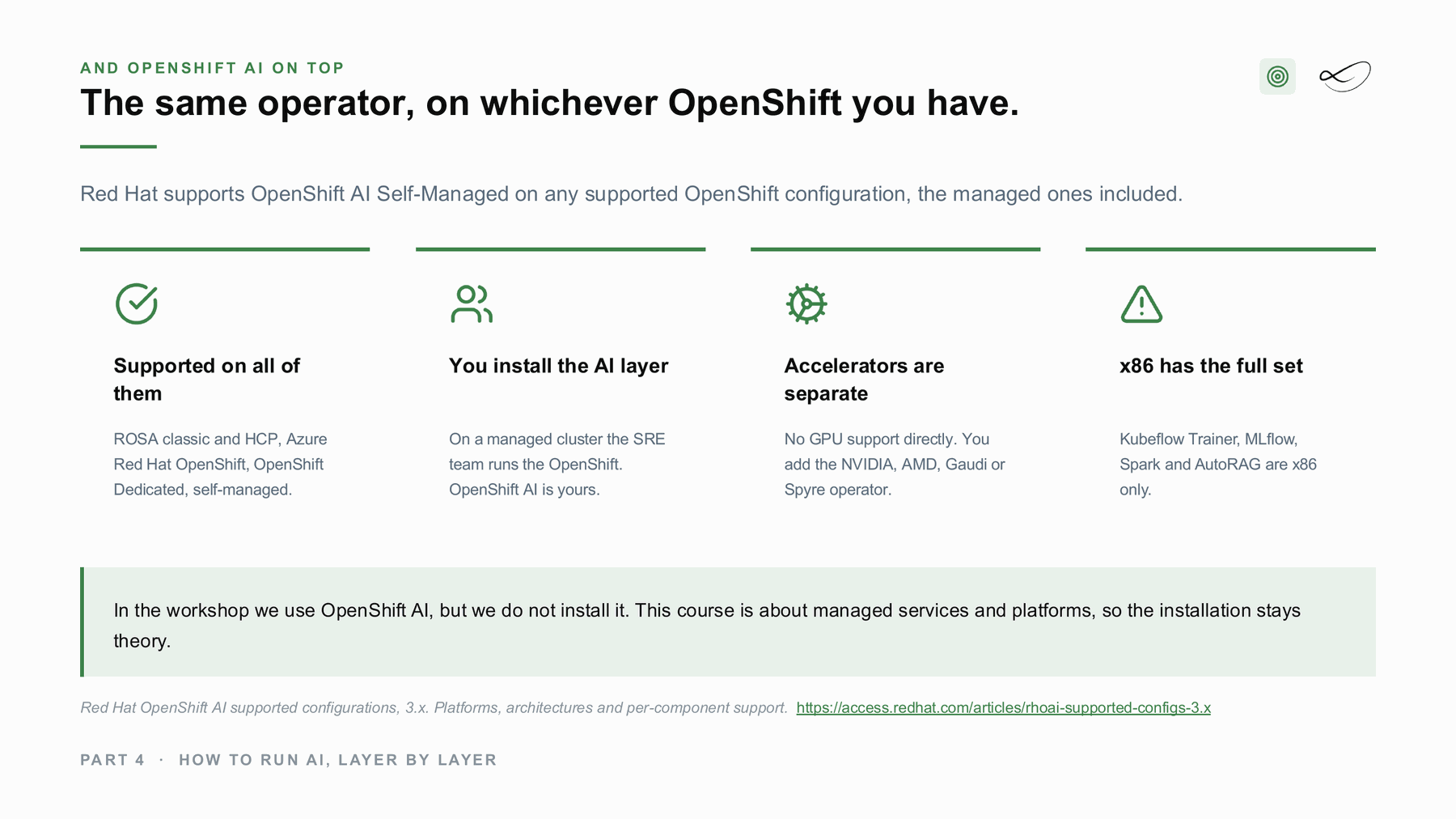
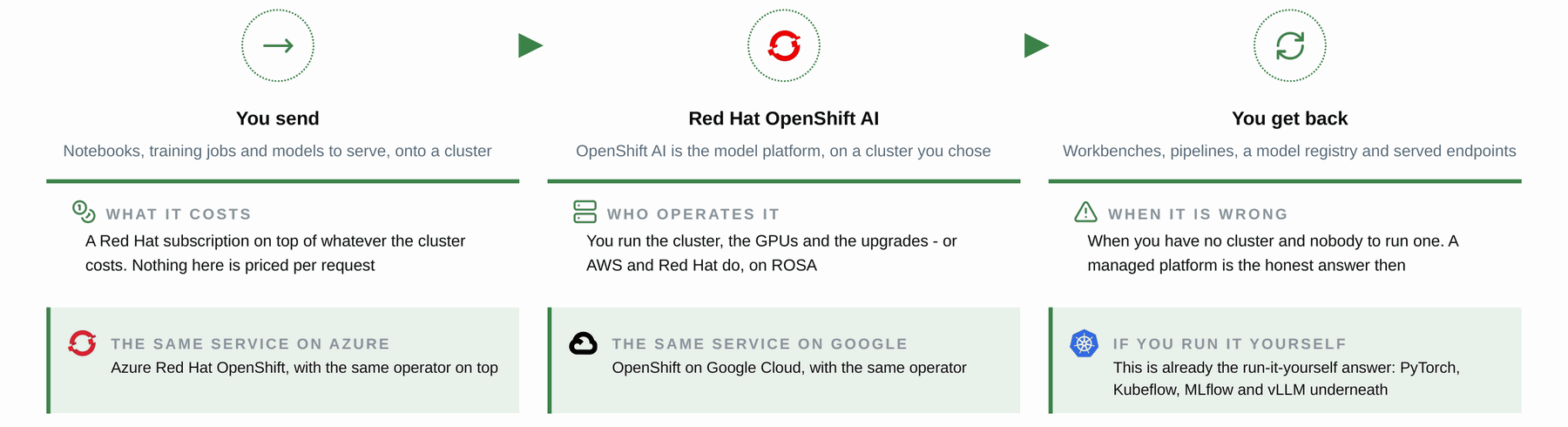
The platform you run yourself, on premises or on a cloud. OpenShift AI bundles open-source components such as PyTorch, Kubeflow, MLflow and vLLM, with Red Hat support; Kubeflow and MLflow can also be assembled without it.
Project page →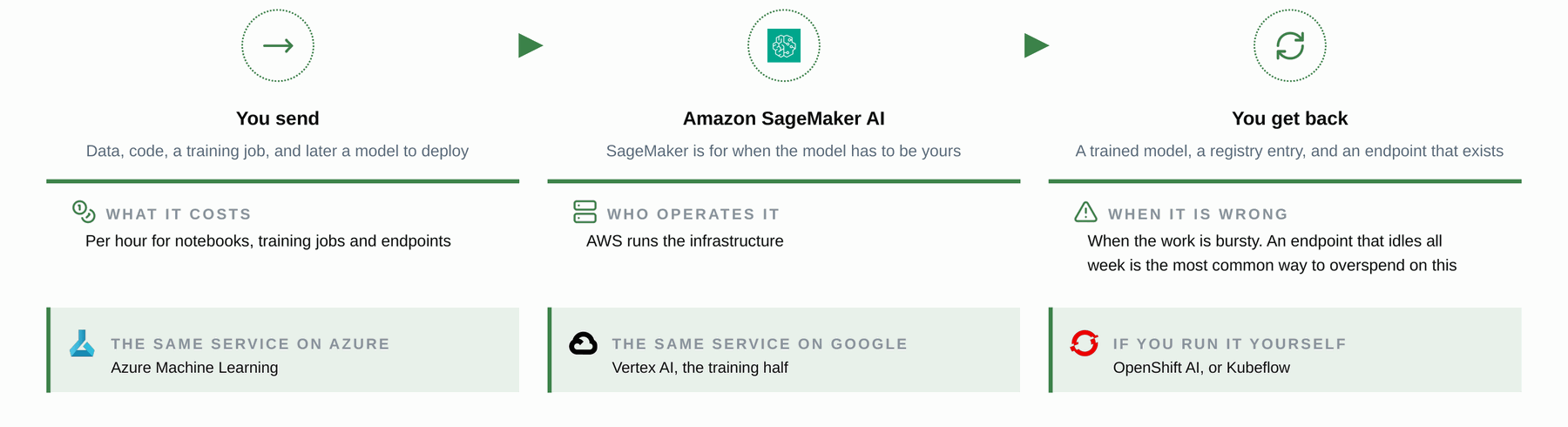
How it looks in an architecture
Slides from my course on AI architectures at FH Burgenland, drawn from real projects.
Where I used it
The event assistant
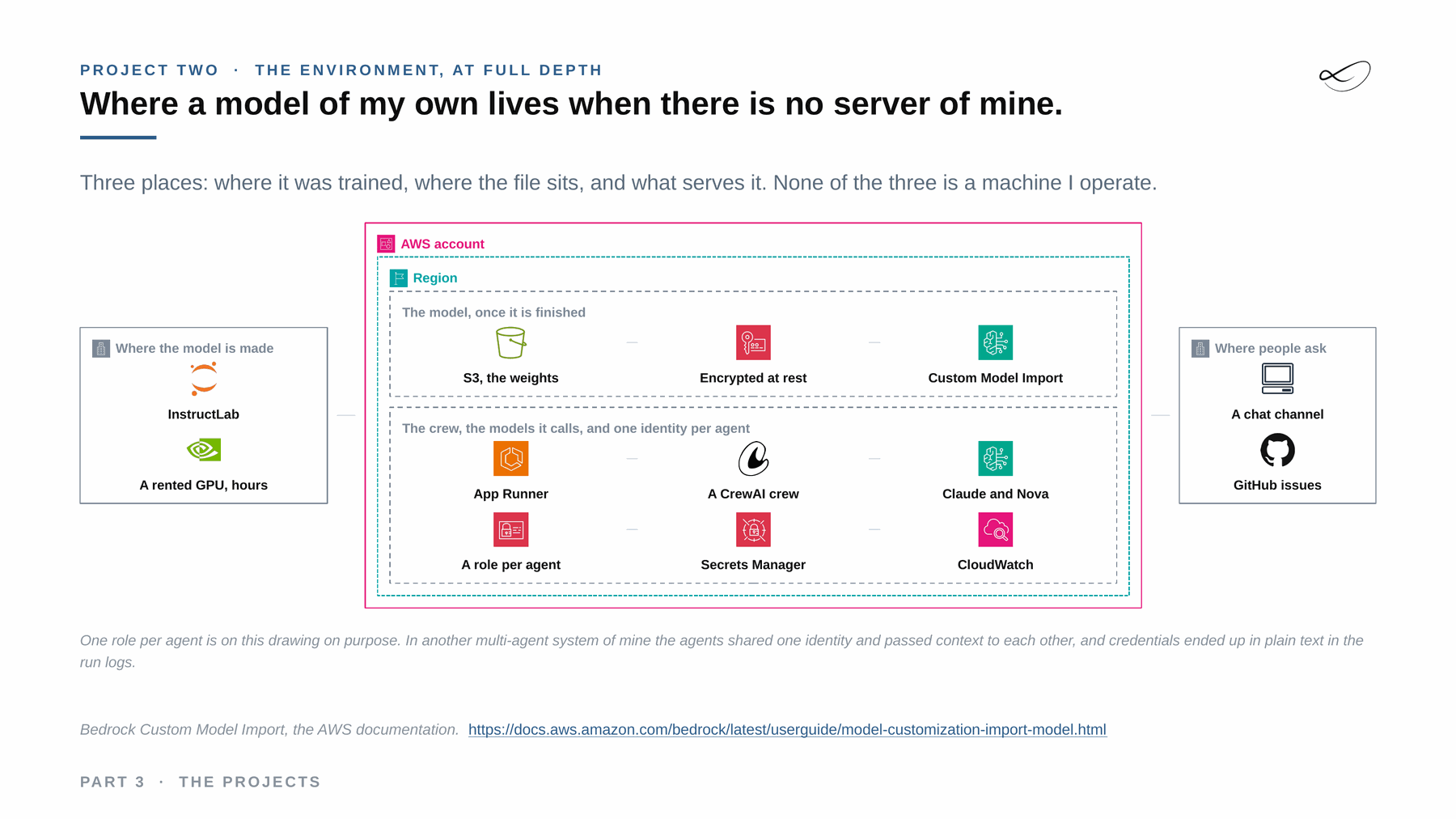
My event assistant needed knowledge no public model has: the group's own history. I fine-tuned a small open model with InstructLab on a rented GPU for a few hours, stored the weights in S3 and serve them through Bedrock Custom Model Import. A SageMaker endpoint was considered and rejected, because it bills for every hour it exists. The whole system runs at about thirty euro a month.
See the reference projects →Managed and self-hosted together: hybrid
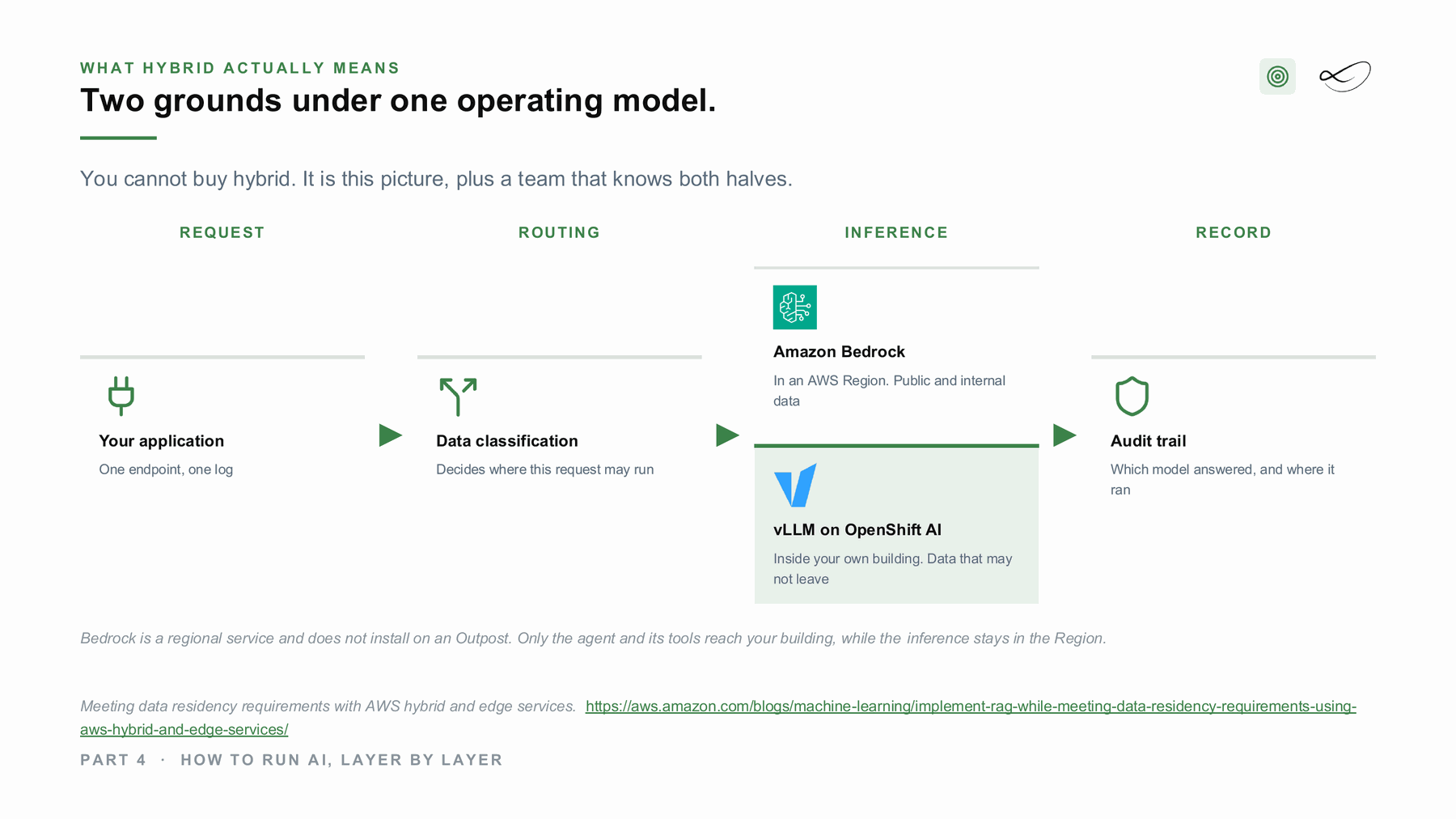
With your own model, the model artefact is yours, and the training data may not be allowed to leave. That splits the work: training where the data is, serving where the users are. On your own platform, hybrid means the same platform installed twice, on machines you own and machines you rent, run as one. Red Hat supports OpenShift AI Self-Managed on the managed OpenShift offerings as well as on your own hardware.[7]
What would help you next?
Learn to decide
The course “From Managed to Hybrid” teaches where AI should run: what each layer costs, what you operate and where your data has to stay. It is in preparation, with a free live session first.
 Linda Mohamed
AI and cloud consultant, AWS Community Hero, Vienna
Build it with me
Tell me what you want to build. In 30 minutes we check which of the four ways fits your data, your rules and your budget, and whether AWS funding for a proof of concept can cover part of it. How AWS funding works →
You already know what you need
Book the workshop directly:
- OpenShift AI on AWS lab →
A guided lab on Red Hat OpenShift AI: model serving on your own platform, next to Amazon Bedrock. - AI Concept and Prototype workshops →
Architecture first, priced per service and tested on your data, then a prototype with a go or stop decision.

Read more on ai-solutions.wiki
My open knowledge base, with longer comparisons, pricing notes and sources.
Sources
- Amazon SageMaker AI documentation. https://docs.aws.amazon.com/sagemaker/latest/dg/whatis.html
- Azure Machine Learning documentation. https://learn.microsoft.com/en-us/azure/machine-learning/overview-what-is-azure-machine-learning
- Vertex AI documentation. https://cloud.google.com/vertex-ai/docs
- Red Hat OpenShift AI, Kubeflow and MLflow. https://www.redhat.com/en/products/ai/openshift-ai
- Linda Mohamed, course slides “The projects”, MASE-3, FH Burgenland, September 2026
- Linda Mohamed, course slides “How to run AI, layer by layer”, MASE-3, FH Burgenland, September 2026
- Red Hat OpenShift AI supported configurations 3.x, Red Hat. https://access.redhat.com/articles/rhoai-supported-configs-3.x
- Amazon SageMaker, ai-solutions.wiki. https://ai-solutions.wiki/tools/amazon-sagemaker/
- Red Hat OpenShift AI, ai-solutions.wiki. https://ai-solutions.wiki/tools/openshift-ai/
- SageMaker vs Bedrock, ai-solutions.wiki. https://ai-solutions.wiki/comparisons/sagemaker-vs-bedrock/
- Custom ML models vs foundation models, ai-solutions.wiki. https://ai-solutions.wiki/comparisons/custom-ml-vs-foundation-models/
- Bedrock Custom Model Import, AWS documentation. https://docs.aws.amazon.com/bedrock/latest/userguide/model-customization-import-model.html
- InstructLab. https://instructlab.ai/
Links checked September 2026. Product names and features change: check the linked pages before you decide.